v0.16.2workforfun · flagship product · now shipping

The native database client that respects production.

DBHome is a fast, safe desktop client for PostgreSQL, MySQL, MongoDB, Redis, SQLite and Amazon Redshift. Built on Rust — not Electron. Passwords never touch disk. Read-only and production guards are enforced in the core, not the UI. Free, forever.
Download for macOS
Free forever · v0.16.2 · live now
Speaks fluently toPostgresMySQLMongoDBSQLiteRedisRedshift
DBHome query editor with results
<250ms
First rows on screen while a query streams in
6
Engines in one native app — SQL, documents, key-value and warehouse
100M
Row tables paged in constant time with keyset seeks
0
Passwords written to disk. Ever. Keychain only.
Supported today

Six engines. One set of muscle memory.

Query them with the same editor, browse them with the same shortcuts, inspect them with the same tools. Switch connections without switching brains.

P
PostgreSQL
primary focus
★ depth

The deepest integration in DBHome: EXPLAIN ANALYZE with buffers, lock trees, bloat and autovacuum, LISTEN/NOTIFY, and a migration-safety check on every schema change.

schemasEXPLAINlocksbloatLISTEN
M
MySQL
full parity

Matched feature-for-feature with Postgres, plus server-side KILL QUERY, dump import, database duplication and user account management.

KILL QUERYdump importusersduplicate DB
Mo
MongoDB
documents

Collections open in the same data grid as SQL tables — filter, sort and page the whole collection, then inspect and edit documents with their types intact.

data gridinspectorinferred schemaaggregate
R
Redis
deep inspection

Every native type plus RedisJSON, streams as tables, live Pub/Sub, cluster topology and memory-by-prefix analysis. KEYS is blocked for safety.

streamspub/subclusterACLsmemory
S
SQLite
local files

Open any .sqlite file or a :memory: database. The same editor, browser, structure and backup tools.

file:memory:backup
Rs
Amazon Redshift
warehouse

Provisioned clusters or Serverless, with password or IAM auth, browsing with total row counts and a WLM queue view.

serverlessIAMWLMstorage
Why it's different

Trustworthy is a feature. We built for it.

Most database tools optimise for the demo. DBHome optimises for the 2 a.m. production incident — where speed, safety and not leaking secrets actually matter.

Other tools
DBHome
Many are Electron apps — hundreds of MB of bundled Chromium, slow to start.
Native Rust core. No bundled browser. Installers from 15 MB.
Credentials often kept in plaintext config files on disk.
OS keychain only. Passwords never touch disk.
Safety checks that live in the UI layer — bypassable.
Guards enforced in Rust. The UI physically cannot bypass them.
OFFSET pagination that gets slower the deeper you scroll.
Keyset pagination. Page 10,000 is as fast as page 1.
Results that block until the full set has loaded.
Results stream in. First rows in under 250 ms.
An UPDATE without a WHERE runs the moment you hit enter.
Unsafe-write guard. Unbounded writes are caught and previewed first.
Cloud AI that sends your data off-device by default.
Schema-only by default. Run fully offline with Ollama; row samples only if you opt in.
Copyleft (GPL / AGPL) dependencies — risky alongside commercial work.
No GPL or AGPL dependencies. License-clean for commercial use.
Feature deep-dive

Everything a query-first human reaches for.

The whole core product is free. Here's what that includes.

Query editor

The editor from VS Code, wired straight to your database.

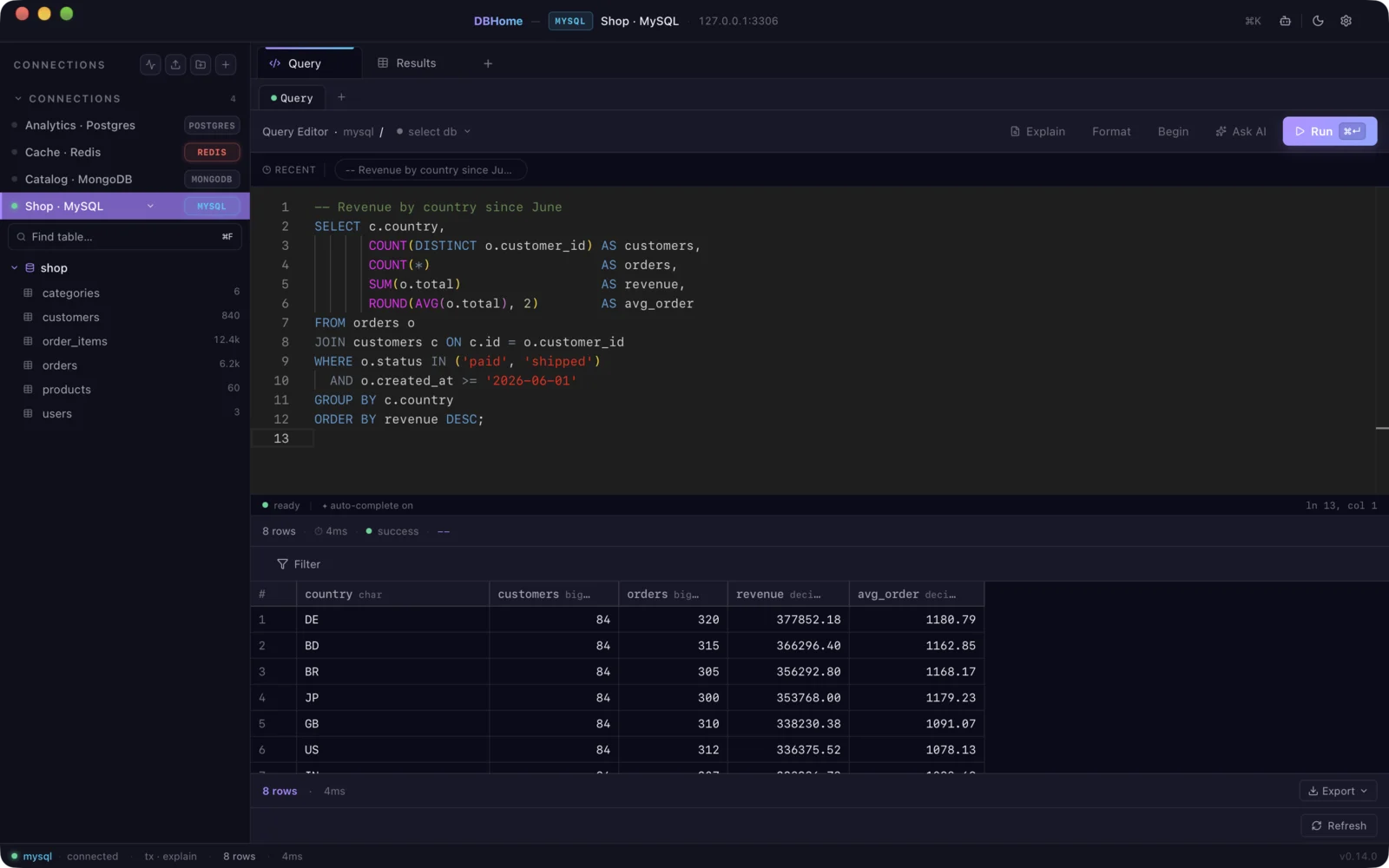
DBHome embeds Monaco — the same engine as VS Code — and splits multi-statement SQL correctly, respecting quoted strings, comments and backtick identifiers.

  • Streaming results — first rows in under 250 ms; a 1M-row query stays under 200 MB.
  • Real cancellation — server-side KILL QUERY for MySQL, token-based for the rest.
  • Tabs, params & a command palette — :param placeholders and ⌘K for everything.
  • Export anything — CSV, TSV, JSON, SQL, Markdown or Excel.
Shop · MySQL · query
Data browsing

Point, click, edit. No SQL required — and no slow OFFSET scans.

Browse any table without writing a query. Keyset pagination keeps page 10,000 of a 100M-row table as fast as page 1. Double-click any cell to edit it in place, filter with AND/OR groups, and follow foreign keys to the related row.
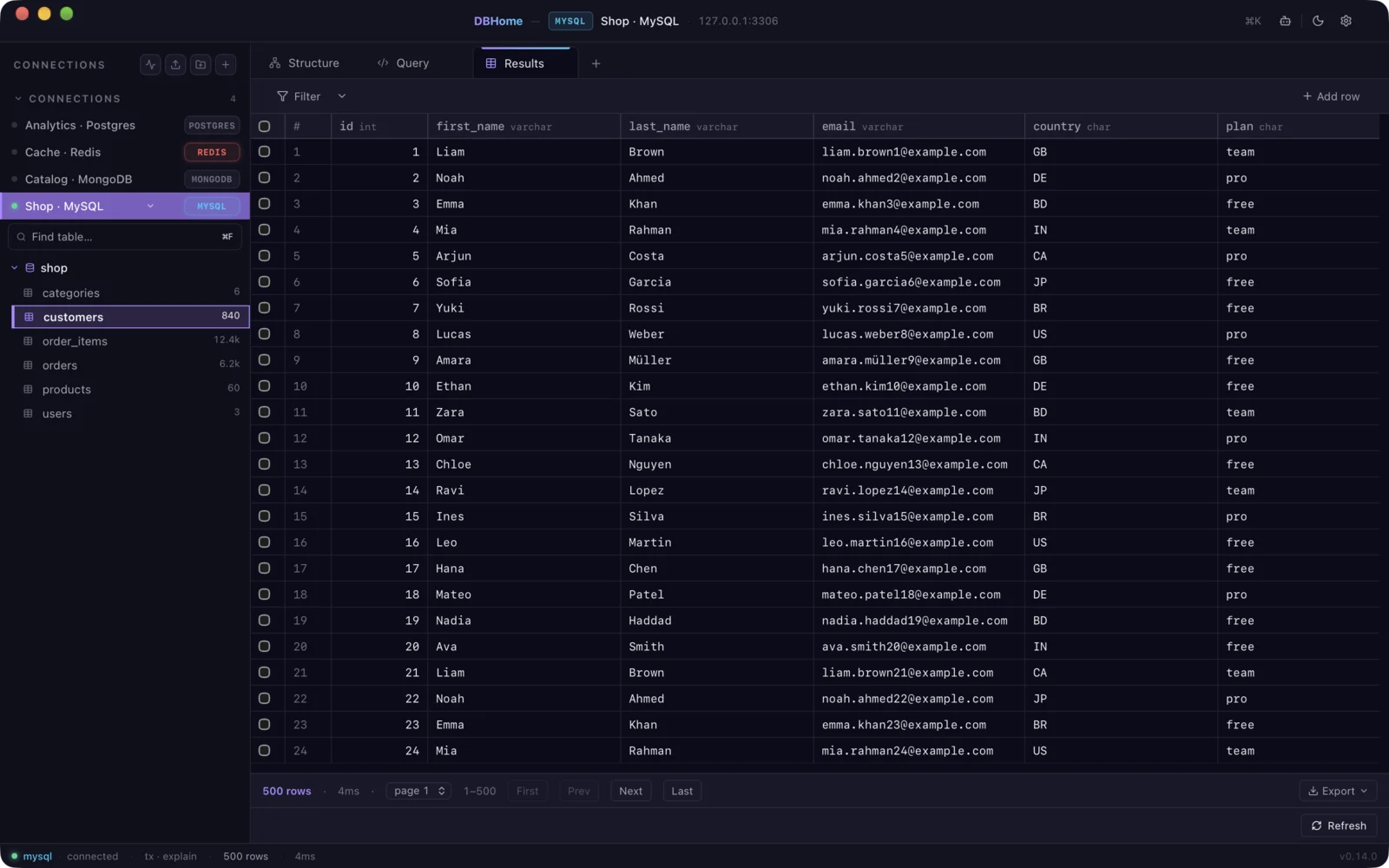
  • Staged, scoped writes — edits queue up, show a preview, and apply as one batch with UPDATE … WHERE pk =.
  • Structure & table designer — columns, indexes, foreign keys, checks, triggers and DDL, editable in place.
  • Schema diff & CSV import — compare two databases and generate the migration; load a CSV into any table.
Shop · MySQL · customers
Schema & plans

See the shape of your data — and why a query is slow.

A live sidebar tree from namespaces down to columns, an interactive ERD, and an EXPLAIN visualiser that renders the plan as a timed tree and flags the expensive nodes.
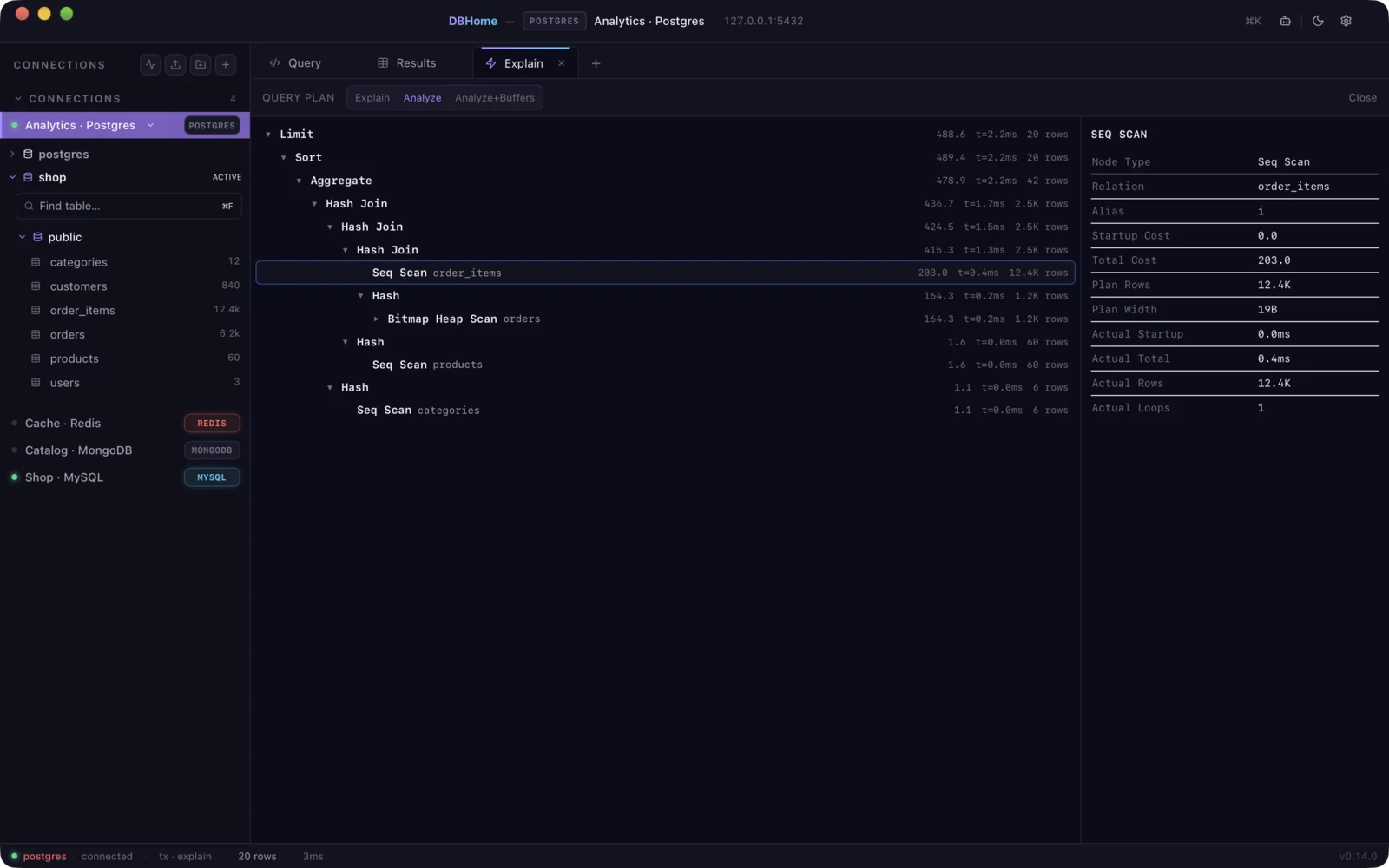
  • Approximate row counts & keys — right in the sidebar, before you click.
  • EXPLAIN ANALYZE, visualised — actual times, row counts and buffers per node.
  • Migration-safety advisor — see whether a schema change locks or rewrites the table before you run it.
Analytics · Postgres · explain analyze
Redis

A real Redis inspector, not a key-value text box.

SCAN-based browsing (KEYS is blocked for safety), a typed inspector for every native type, a live Pub/Sub monitor and memory-by-prefix analysis to find what's eating your instance.
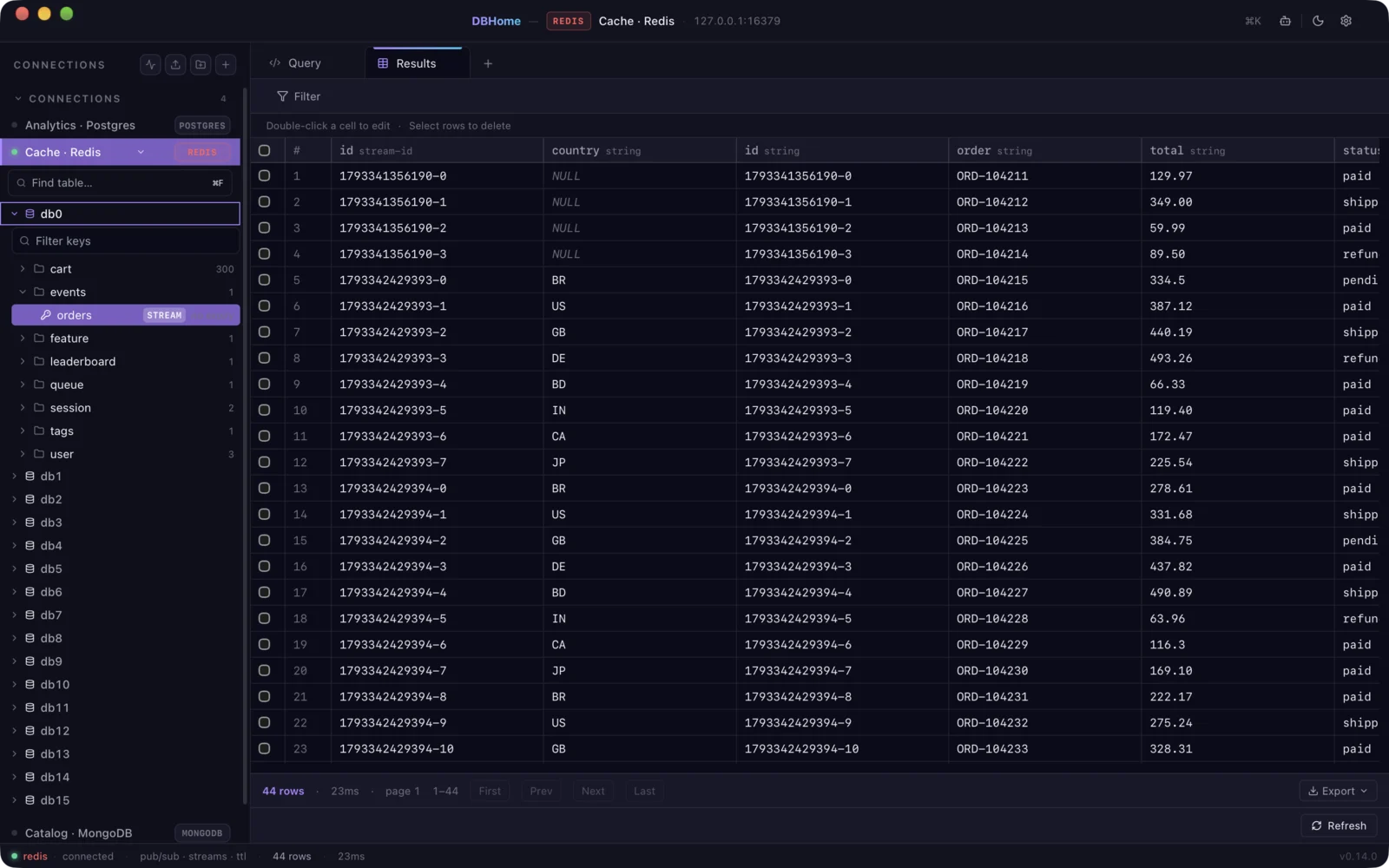
  • Every type, fully — string, hash, list, set, sorted set and streams.
  • Keys as tables — open a prefix, a stream or a RedisJSON key as a grid; three stream views.
  • Live Pub/Sub & TTL tools — watch channels stream; set, clear or persist TTLs.
Cache · Redis · events:orders
MongoDB

Documents in the same grid as your SQL tables.

Collections open in the shared data grid — filter, sort, page and count the whole collection. Click a row to open the document inspector; every edit keeps each field's BSON type and shows a preview before it writes.
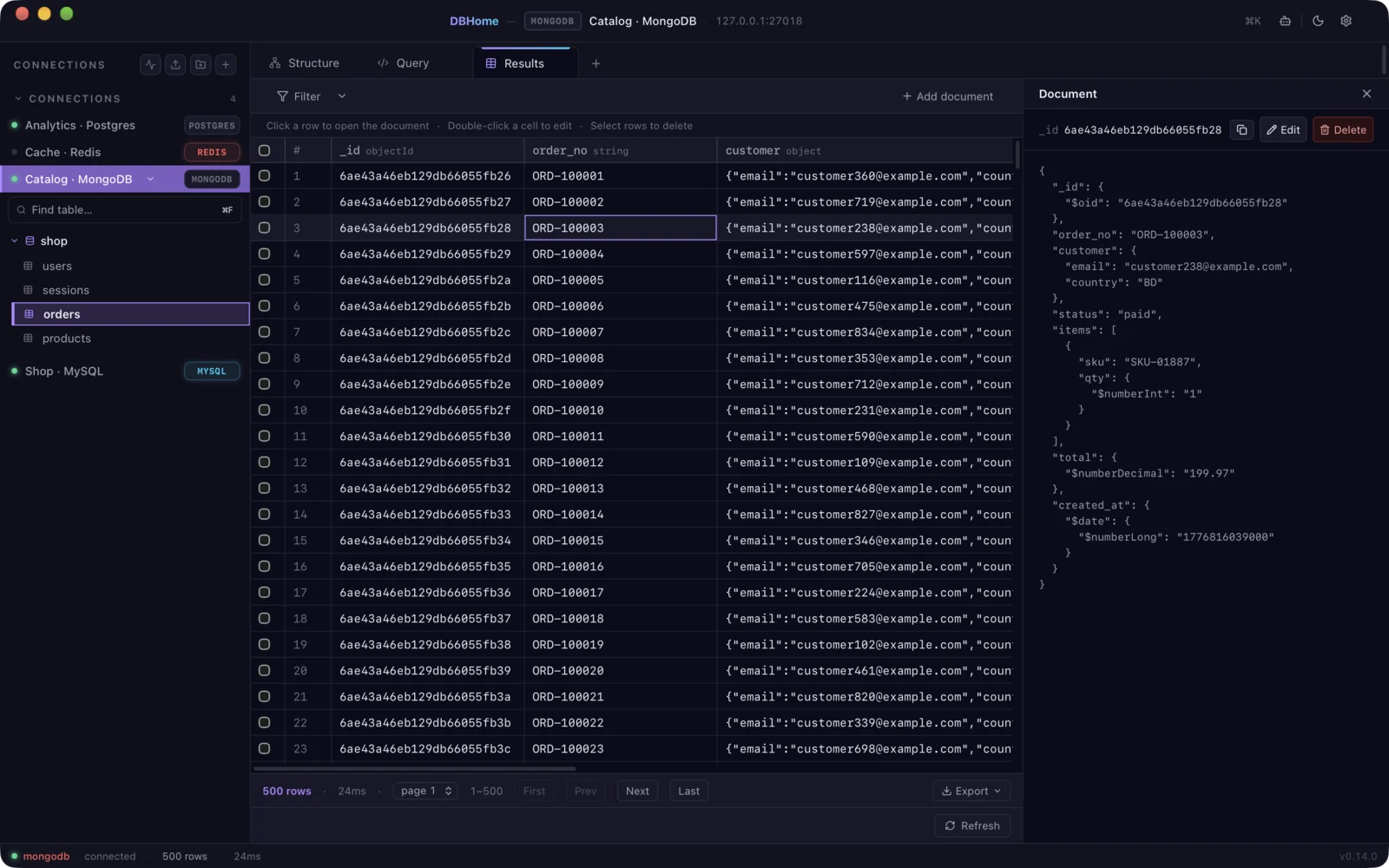
  • Document inspector — the full document as Extended JSON, with typed edits and delete.
  • Inferred schema — field types and presence % from sampled documents, in the Structure tab.
  • find & aggregate — run queries and pipelines as JSON in the Query tab.
Catalog · MongoDB · orders
AI assistant

AI that helps with SQL — without leaking your data.

Run completely offline with Ollama, or bring your own Anthropic or OpenAI-compatible key. By default only table and column names are sent — never rows. Sharing redacted samples is an opt-in you control.
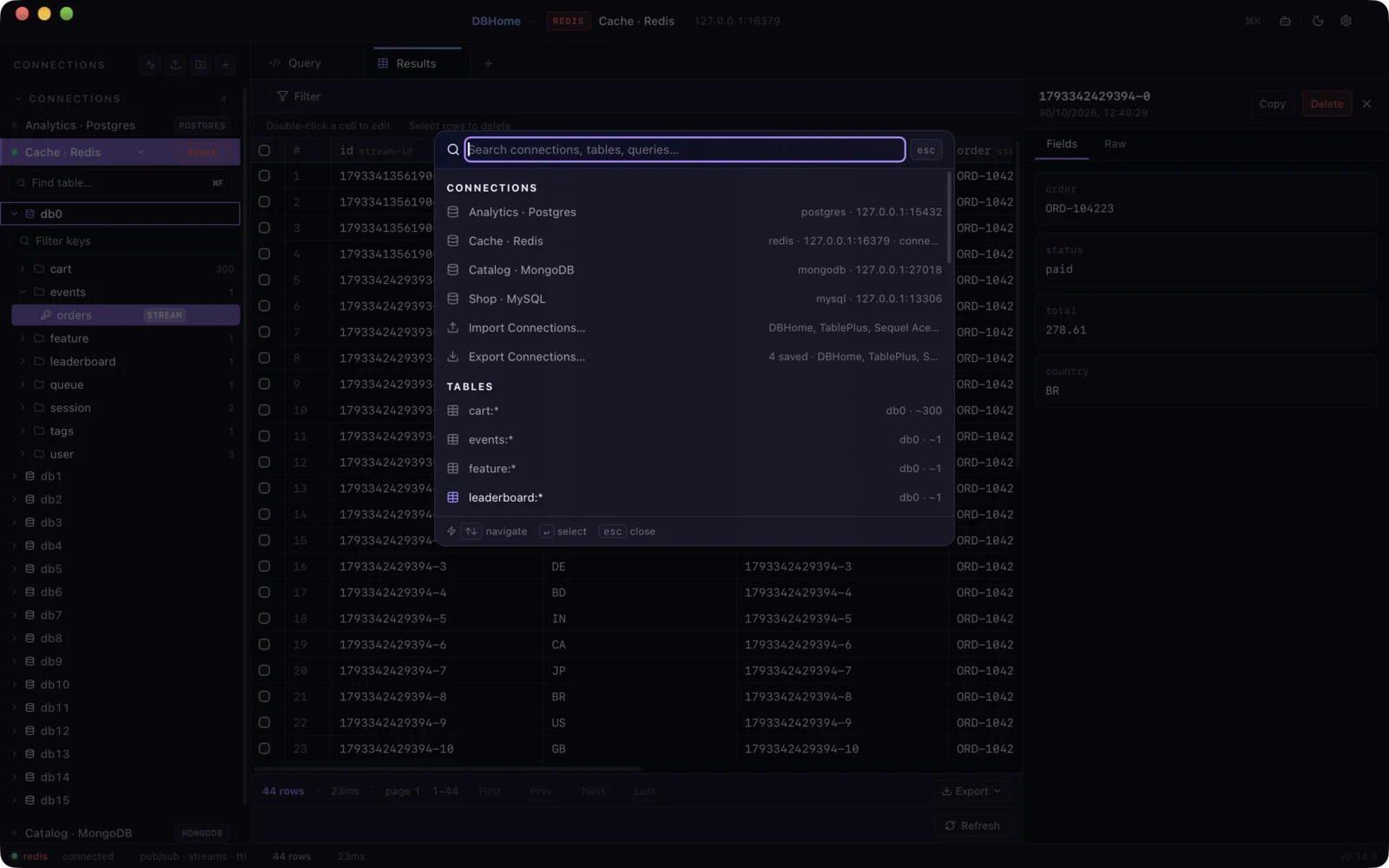
  • Local & private — Ollama support means zero data leaves your machine.
  • BYOK, stored safely — keys live in your OS keychain, never in plaintext.
  • Schema-aware — suggestions that actually fit your tables, streamed live.
command palette

Monitoring

Active sessions, lock trees, slow queries, missing indexes, cache hit ratio and replication lag — with 1h / 24h / 7d history.

Health advisors

17 background checks across Postgres, MySQL and Redis — wraparound, bloat, bad indexes — with desktop alerts.

Fleet view

Group connections and see reachability, sessions and the worst finding across all of them at a glance.

Backup & restore

SQL dumps for MySQL and Postgres, SQLite snapshots, and "back up this table first" before risky changes.

Production flag

Mark a connection production and every write needs explicit confirmation — a one-time token checked in the Rust core.

Read-only, enforced

Refused in the Rust drivers, not hidden in the UI — and enforced server-side on MySQL.

Audit log

Every write recorded locally with PII-redacted SQL. Search it, export it as CSV.

SSH & SSM tunnels

Password or key SSH in-process with trust-on-first-use host keys, or AWS SSM. Native TLS throughout.

Bring your connections

Import from TablePlus, Sequel Ace, DBeaver, Navicat or a project's .env — passwords go straight to the keychain.

History & snippets

Full-text search across everything you've run, plus reusable SQL with :params, scoped per engine or connection.

Keyboard-first

Every view reachable from the keyboard, ⌘K for everything, and a shortcut cheat sheet in its own window.

Signed auto-updates

Checks hourly in the background and installs signed updates — no manual downloads after the first.

Pricing

The powerful part is free. Forever.

A fast, secure desktop database client is and always will be free — including the monitoring, health advisors and audit log. Paid tiers only add cloud sync and team features on top, never the core.

Free
$0 / forever
The full core product. Not a trial, not a teaser — the real thing.
  • All six databases
  • Unlimited connections
  • SSH & AWS SSM tunnels, keychain
  • AI assistant (Ollama or BYO key)
  • Monitoring & health advisors
  • Backup, schema diff & EXPLAIN
  • Staged writes & audit log
Download DBHome
Sync
Cloud
Coming soon
Your saved connections and snippets, identical on every device — including mobile.
  • Everything in Free
  • Cross-device sync
  • Snippet & history sync
  • iOS & Android (planned)
  • Encrypted, end-to-end
Join the waitlist
Pro / Team
Planned
For teams that share databases — shared setup and oversight on top of everything that's free.
  • Everything in Cloud
  • Shared connections & snippets
  • Team seats & roles
  • Central audit export
  • Priority support
Get notified

Cloud & Pro pricing isn't set yet — and we'll never paywall a feature that's free today.

Coming soon

A clear line from query runner to real DBA tool.

Monitoring, health advisors, staged writes, the audit log, backup and the migration-safety advisor have all shipped. Here's what's landing next, in order.

NowIn progress

Safe database access for AI agents

Let AI agents query your databases through DBHome over MCP — with the same read-only enforcement, production gate, statement timeouts, audit log and redaction that protect you in the app, instead of a raw connection string.

MCP serverread-only by defaultper-table scopeaudited
NextPlanned

Data platform

Streaming import and export that doesn't hold the result in memory, a type-aware grid v2 with JSON, image and geo rendering, and query completion that knows more of your schema.

streaming CSV / NDJSON / Parquetgrid v2smarter completion
NextPlanned

Guarded server operations

Maintenance actions — VACUUM, ANALYZE, REINDEX, OPTIMIZE — behind the same production guards and linked from health-advisor findings, plus a server-config viewer and Postgres / MySQL role and grant management.

maintenance actionsconfig viewerroles & grantsproduction-gated
LaterExploring

More engines & cloud sync

SQL Server is the next engine under consideration, alongside encrypted sync of connections and snippets across your devices — and eventually mobile.

SQL Servercloud synciOS & Android
Download

Native on every desktop. Live now. No Chromium.

Grab DBHome for your platform. Free forever, now shipping v0.16.2. Release notes

macOS
Universal .dmg
Apple Silicon & Intel
Download .dmg
Linux
AppImage · .deb · .rpm
x86_64
Download AppImage
Windows
Windows 10 & 11 · x64
.msi installer or setup .exe
Download .msi
iOS & AndroidPlanned · Cloud sync tier
FAQ

The questions developers actually ask.

Is it really free?
Yes. The entire core product — every database, every current feature including monitoring, health advisors, backup and the audit log, SSH tunnels, the AI assistant, unlimited connections, history and snippets — is free forever. Paid tiers will only add cloud sync and team features on top.
Is it built on Electron?
No. DBHome is a native app built on Rust + Tauri. There's no bundled Chromium — installers are 15–45 MB, a fraction of a typical Electron app.
Where are my passwords stored?
In your operating system's keychain — macOS Keychain, Windows Credential Manager, or libsecret/kwallet on Linux. Passwords never touch disk and never cross to the UI layer.
Does the AI see my data?
Not by default. Only table and column names are sent as schema context, and sensitive column names are redacted. Sharing redacted sample rows is an opt-in setting. With Ollama you can run the AI completely offline, so nothing leaves your machine. Cloud keys are stored in your keychain.
How does it protect production?
Mark a connection as production and every write needs explicit confirmation, checked with a one-time token in the Rust core. A read-only flag is enforced in the drivers — the UI cannot bypass it. UPDATE or DELETE without a WHERE is caught and previewed, edits are staged and applied as one batch, and every write lands in a local audit log.
Can I bring my existing connections?
Yes. Import from TablePlus, Sequel Ace, DBeaver, Navicat, a connection URL, a my.cnf or a project's .env file — or drag an export onto the app. Passwords go straight to your keychain.
Does it update itself?
Yes. DBHome checks for updates in the background and installs signed releases, so you only download it once.
What's the license?
DBHome is free to use, including for commercial work. It ships with no GPL or AGPL dependencies — only permissive licenses like MIT and Apache-2.0 — so it's safe alongside closed, commercial projects.
Which databases are supported?
Today: PostgreSQL (the deepest), MySQL, MongoDB, Redis, SQLite and Amazon Redshift. MariaDB generally works through the MySQL driver but isn't tested separately. SQL Server is the next engine under consideration.

Stop fighting your database tool.

DBHome is fast, safe, native and free. Download it and run your first query in under a minute.